

Understanding your emissions is the first step in emissions management. It usually involves knowing your greenhouse gas (GHG) emissions and the carbon stored on your farm (known as your GHG account). It can also include calculating the emissions intensity of your products. There are calculators to help you estimate your account and emissions intensity.
Understand farm emissions
Different activities on farms release greenhouse gases (GHGs) including carbon dioxide (CO₂), methane (CH₄), and nitrous oxide (N₂O). Some farm activities can also store carbon in plants and soil.
To determine your GHG account, we look at both the emissions released and the carbon captured and stored.
Understand different sources of farm emissions
Greenhouse gas (GHG) emissions are grouped into three categories known as ‘scopes.’ Understanding these sources of emissions is important for making informed decisions about how to manage emissions effectively.
On a farm, these scopes are:
- Scope 1: Direct emissions from farm activities
- These include activities like fertiliser use and emissions from livestock and manure.
- Scope 2: Indirect emissions generated from grid electricity purchased for farm activities
- These include electricity to supply heating and cooling to buildings.
- Scope 3: Indirect emissions that occur in the supply chain that are associated with farm activities
- These include upstream emissions, such as manufacturing and transporting goods (including fertiliser and animal feed) to a farm, and downstream emissions, such as the processing of farm products (such as food manufacturers) or waste.
- Lower emissions from these inputs can help reduce your overall emissions.
For more information on sources of emissions on farms see understand emissions management.
Greenhouse gas accounts
A GHG account is a way for you to track your farm’s emissions and the carbon stored in the land, also known as your carbon footprint.
Why your greenhouse gas account matters
A GHG account helps you to understand and manage your emissions. It can be used to:
- set a baseline for emissions and carbon storage, which helps identify opportunities to reduce emissions and store more carbon
- show supply chain businesses, banks and consumers evidence of your carbon footprint and the work you do to reduce it
- measure emissions intensity.
How a GHG account works
GHG accounts work like a balance sheet:
- debits are emissions (scope 1, 2 and 3)
- credits are carbon that has been stored by the farm
- the balance shows the difference between the two.
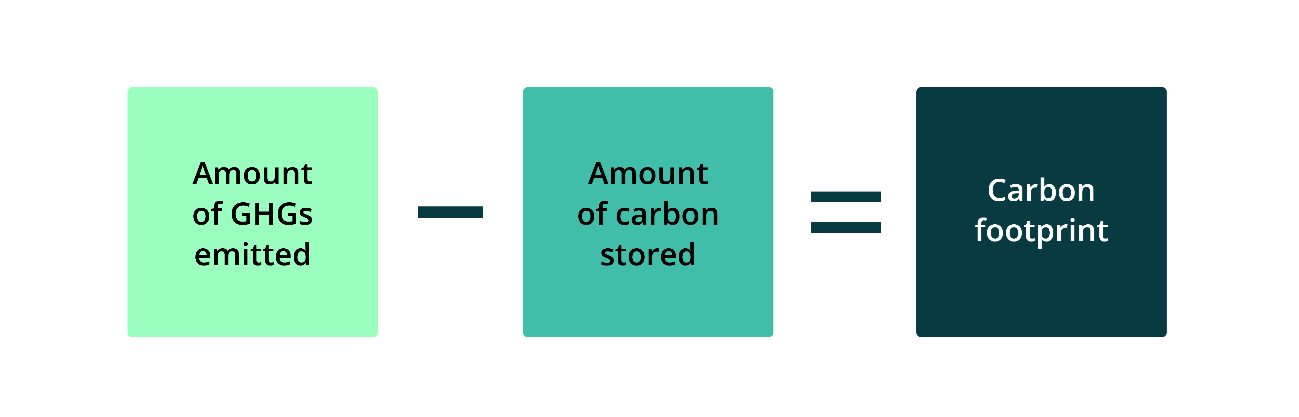
The starting point of a GHG account is an estimate of emissions minus carbon stored over a set period. This process identifies where emissions are coming from. It also creates a baseline so that you can measure your progress in reducing emissions and increasing carbon storage.
The area covered by your account is called the emissions or operational boundary. This boundary usually includes areas and activities under the business’s control (scope 1 & 2 emissions). The emissions boundary may also include emissions from the supply chain. These are scope 3 emissions and can include:
- upstream activities only (known as cradle to farm-gate) or
- upstream and downstream activities (known as cradle to factory gate).
See more information on boundaries (CEFC).
There are different ways to construct a GHG account, and the approach you use depends on the purpose of preparing the account. For example, engaging in the ACCU Scheme (CER) requires specific methods for estimating GHG emissions and carbon stored.
Insetting
Having a GHG account is important if you are considering insetting your emissions.
Insetting generally means reducing emissions within your own business and counting this within your carbon footprint, rather than buying or selling carbon credits, which is called offsetting. Insetting can help you meet your own sustainability goals and, if applicable, those of your bank or supply chain. You may be able to use insetting to market your products as carbon neutral.
To inset you will need to:
- know your emissions baseline
- engage in management practices to lower emissions or store carbon
- recalculate your emissions regularly to track your progress.
If you have an ACCU Scheme project, you can inset by choosing to cancel any ACCUs you have received for reducing emissions, and count this in your carbon footprint.
See more information on calculating farm emissions and insetting (NSW Government).
See participate in the ACCU Scheme for more information on offsetting.
Understand emissions intensity
A GHG account tracks a farms total GHG emissions over time. In contrast, emissions intensity is a way to measure the emissions associated with a unit of output, for example emissions per tonne of grain produced, or per head of cattle. The lower the emissions intensity, the fewer emissions are required to produce that output.
Important things to know:
- You can calculate your emissions intensity if you know how much you produce and your total emissions. If your farm produces different types of crops or livestock, you’ll need to divide the emissions across each product proportionately, then calculate emissions intensity.
- Lowering the emissions intensity of your production does not always mean you are lowering total farm emissions, as production may increase. That’s why it’s important to track both total emissions and emissions intensity.
Calculators
A calculator estimates your farm’s greenhouse gas emissions and carbon storage. It can help you:
- estimate emissions based on your farm’s activities
- calculate emissions intensity
- track the progress of emission management activities.
Choosing the right calculator
There are different types of calculators. Things to know:
- Some calculators are simple and give more generalised results, others are more detailed.
- Each tool has pros and cons depending on how it works.
- You should pick a calculator relevant to your commodity.
- Using the same tool over time helps you consistently track changes in your emissions.
- Any tools used to work out a farm’s greenhouse gas emissions should align with the Australian National Greenhouse Accounts (DCCEEW).
- If you are engaging in programs like the ACCU Scheme, they have specific rules for working out greenhouse gas emissions. These rules might involve using computer models, data collected from the field, or a mix of both.
The Australian Government is developing ‘Voluntary Emissions Estimation and Reporting Standards or Guidelines’ for agriculture, fisheries and forestry industries. The guidelines aim to improve the quality and consistency of estimation methods and tools. The tool you use should be aligned with the guidelines once they are published in 2026.
Example calculators
There are many tools available to help calculate GHG emissions and carbon storage on farms.
These tools have been developed by a range of organisations, including universities, research centres and industry groups. Some examples are:
- Multiple commodities: Agricultural Innovation Australia Environmental Accounting Platform
- Multiple commodities: Tools | Primary Industries Climate Challenges Centre
- Dairy: Australian Dairy Carbon Calculator
- Livestock: Meat and Livestock Australia Quick Start Carbon Calculator and MLA Carbon Calculator
- Pork: Australian Pork PigBal 5 Calculator
- Wine: Carbon Calculator - The Australian Wine Research Institute
See Pathfinder and Agriculture Victoria for more examples of calculators.
This is not an exhaustive list. There are also many private calculators available that you can find by searching online.
Additional resources
Explore resources on farm emissions:
- Reducing emissions on farm: Learn about the steps you can take to know and reduce emissions on your farm.
- On-farm greenhouse gas emissions: Find out more about on-farm emissions and why they’re important for growers.